As featured in
YouTube Extension Features
Everything Your YouTube Experience Was Missing
Turn Off the Lights is not just a dimmer. It is a complete YouTube browser extension packed with tools to make every video feel like a private cinema screening.
Cinema Mode Dimming
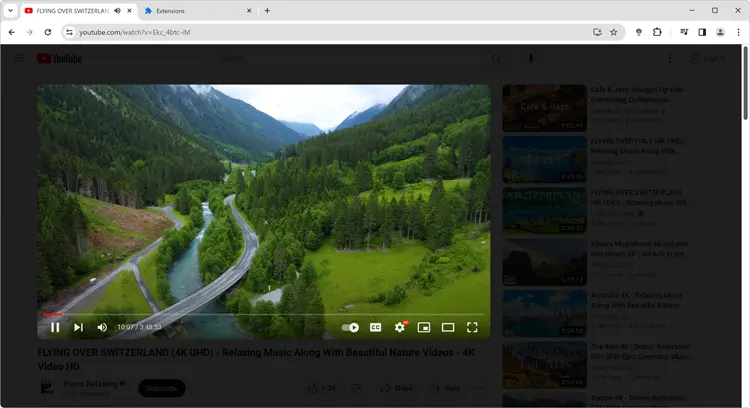
One click on the lamp icon fades the entire YouTube page to black, keeping only the video visible. Adjust opacity and color to your liking.
YouTube Night Mode
Toggle YouTube between full dark and light theme with a single switch placed directly on the YouTube interface — no settings menu required.
Auto HD up to 8K
Turn Off the Lights automatically sets YouTube videos to your chosen quality — highres, 8K, 4K, 1080p, 720p — the moment they load.
Atmosphere Lighting
A cinematic glow radiates from around the YouTube video player, mirroring the dominant colors of the video in real time for a truly immersive feel.
Dynamic Background
Replace the dark overlay with animated backgrounds — including patterns, gradients, and even a fish-tank animation — behind your YouTube video.
Audio Visualization
Watch sound-reactive visual effects bloom over your YouTube video while it plays. Choose from Blocks, Frequency bars, or Music Tunnel styles.
Mouse Volume Scroll
Scroll your mouse wheel anywhere on a YouTube page to control the video volume — no need to drag the tiny volume slider ever again.
Screenshot Capture
Capture a frame of any YouTube video with filters applied. Save as PNG, JPEG, BMP, or WEBP — perfect for thumbnails, memes, and references.
Video Optimization
Fine-tune brightness, contrast, saturation, zoom, and rotation directly on any YouTube video without touching YouTube's own settings.
Getting Started
Install the YouTube Extension in Under 30 Seconds
Turn Off the Lights is available in every major browser store and updates automatically. There is nothing to configure — it works on YouTube the moment you install it.
Click "Add to Browser"
Visit the Chrome Web Store, Firefox Add-ons, or Edge Add-ons and search for Turn Off the Lights, or click the button above.
Open Any YouTube Video
Navigate to YouTube and open any video. You will see the lamp icon appear in your browser toolbar automatically.
Click the Lamp to Dim
Click the golden lamp icon. The entire YouTube page fades to dark — only the video player stays lit. Click the dark layer again to restore the page.
Customize Your Experience
Right-click the lamp icon and select Options to enable Night Mode, Auto HD, Atmosphere Lighting, and dozens of other YouTube-specific settings.

Browser Support
One YouTube Extension. Every Browser.
Turn Off the Lights is the only YouTube extension available across all major desktop and mobile browsers. Install it once and it follows your browser account automatically.
⬇ Download Free YouTube Extension


FAQ
Frequently Asked Questions about this YouTube Extension
Turn Off the Lights is widely regarded as the best YouTube extension. It combines cinema-mode dimming, Night Mode, Auto HD up to 8K, Atmosphere Lighting, Audio Visualization, and dozens of other YouTube-specific features — all for free. It has been featured by Lifehacker, CNET, ZDNet, BuzzFeed, and PC World.
Open your browser's extension store (Chrome Web Store, Firefox Add-ons, Edge Add-ons, etc.), search for "Turn Off the Lights", and click Add to Browser. It takes less than 10 seconds and is completely free. After installation, open any YouTube video and click the lamp icon in your toolbar to dim the background.
Yes — YouTube is the primary platform this extension was built for. It offers a dedicated YouTube Night Mode switch, Auto HD quality control, Auto Wide player mode, Atmosphere Lighting around the video, volume control via mouse scroll, screenshot capture, video filters, and more. It also works on Vimeo, Twitch, Dailymotion, and any site with an HTML5 video player.
Yes. Turn Off the Lights is completely free. There are no subscriptions, no ads, no paywalled features, and no tracking. The extension is fully open-source under the GNU General Public License Version 2 (GPLv2). The source code is publicly available on GitHub.
Yes. The Auto HD feature in Turn Off the Lights lets you set a preferred YouTube video quality — from 144p all the way up to 8K. Every YouTube video you open will automatically play at your chosen quality, bypassing YouTube's own quality selection logic.
Atmosphere Lighting creates a cinematic color glow around your YouTube video player that mirrors the dominant colors of the video content in real time. It turns your browser into a TV bias-lighting setup, reducing eye strain and increasing immersion — all without any extra hardware.
Deep Dive
Why Turn Off the Lights is the Most Complete YouTube Extension Available
When people search for a YouTube extension, they usually want one thing: a better viewing experience. YouTube's native interface is functional but cluttered — ads, recommendations, comments, and interface chrome all compete for attention while a video is playing. Turn Off the Lights was designed from the ground up to solve this problem elegantly.
Unlike other YouTube extensions that focus on a single feature, Turn Off the Lights is a complete YouTube enhancement suite. Its signature feature — dimming the browser background with a smooth fade animation — was inspired by the experience of watching a film in a dark cinema. When you click the lamp, everything around the YouTube video fades to black. The video player stays lit, centered, and undistracted. Clicking the dark layer brings everything back instantly.
Cinema Mode for YouTube
The cinema mode in this YouTube extension is fully customizable. You can change the opacity of the dark overlay (from a light dimming effect to near-total blackout), choose a custom overlay color, and even enable auto-dim so the overlay activates automatically whenever a YouTube video starts playing — and lifts automatically when you pause.
Night Mode Designed for YouTube
YouTube has its own dark mode, but it requires navigating into account settings. The Turn Off the Lights YouTube extension places a Night Mode toggle switch directly on the YouTube interface so you can flip between dark and light theme instantly — no account required. Night Mode also works on every other website you visit, making the entire browser dark for comfortable late-night browsing.
Auto HD: Never Watch a Blurry YouTube Video Again
One of the most-loved features of this YouTube extension is Auto HD. YouTube often defaults to lower quality based on your reported internet speed. Turn Off the Lights overrides this: set your preferred quality once — 4K, 1080p, or whatever you like — and every YouTube video loads at that resolution from the very first frame. Qualities up to 8K are supported for future-proofing.
Open Source, Private, and Ad-Free
Turn Off the Lights collects no personal data, displays no ads, no yearly subscription, and never monetizes your browsing history. Its source code is publicly available on GitHub under the GPLv2 license so anyone can audit exactly what it does. It has been in continuous development since 2009 and remains the most trusted YouTube extension in the market, with millions of active users across all major browsers.