
YouTube Adjustments: Keep Controls Above the Dark Layer
Likes, title, playlist and more stay visible while the rest of the page dims
When the lights are off on YouTube, you may still want the like button, the video title or the playlist within reach. YouTube Adjustments in the free Turn Off the Lights browser extension let you choose exactly which elements stay above the dark layer, hundreds of options to shape YouTube your way.
Elements you can keep on top
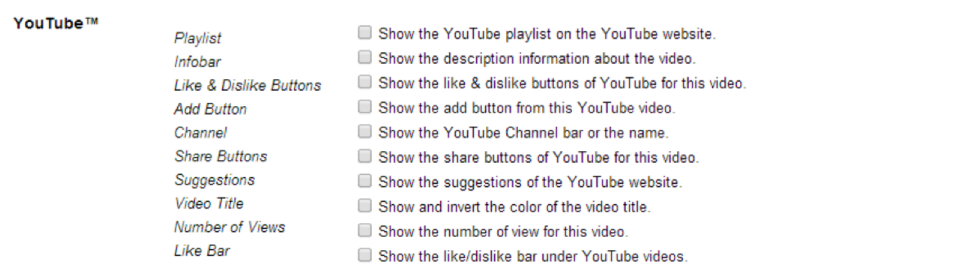
- Show the like and dislike buttons
- Show the video title and description
- Show the view count and the likes bar
- Show the share and add buttons
- Show the playlist and video suggestions
- Show YouTube 360° video in one frame
The video toolbar
Turn Off the Lights can also add a toolbar below the video player with quick controls: a filter button, a repeat button, and a fit-to-screen option that resizes the video automatically when your browser window changes size.
How to enable YouTube Adjustments
- Install the free Turn Off the Lights extension for Chrome, Firefox, Edge, Opera, Safari or your favorite browser.
- Right-click the gray lamp button and choose Options, the YouTube adjustments are on the first tab.
- Check the elements you want above the dark layer, then dim the page on YouTube and enjoy.
Frequently asked questions
How do I keep the like button visible when the page is dimmed?
In the Turn Off the Lights options page, enable the items you want above the dark layer, like and dislike buttons, video title, playlist, view count and more. They stay visible and clickable while everything else dims.
What YouTube elements can I show above the dark layer?
You can surface the likes and dislikes, the likes bar, the video title, description, view count, share and add buttons, the playlist, video suggestions, and even flatten 360-degree video into one frame.
What is the video toolbar?
The video toolbar appears below the player and adds quick controls: a filter button, a repeat button, and a fit-to-screen option that resizes the video automatically when your browser window changes size.
Is Turn Off the Lights an official YouTube extension?
No. Turn Off the Lights is an independent, free and Open-Source browser extension developed for use with YouTube and other video sites, it is not affiliated with YouTube or Google.
A level of control no other extension offers. Download Turn Off the Lights and make YouTube yours.