
Table of Contents
Introduction
Are you looking for the Google Docs Dark Mode version? Then you are on the correct help page. Thereby we will explain to you the history of this product and its Google Doc Dark Mode product. And the steps on how you can enable this Dark Mode version in your web browser. That is 3 easy steps for all web browsers (Google Chrome, Firefox, Opera, Safari, Brave, Vivaldi, Maxthon, Naver Whale, and Microsoft Edge).
Google Docs is an online word processor included as part of the free, web-based Google Docs Editors suite offered by Google, which also includes Google Sheets, Google Slides, Google Drawings, Google Forms, Google Sites, and Google Keep. The Google word processor was released initial release date on 9 March 2006.
Does Google Docs have a dark mode?
Not on the web — the Google Docs website has no built-in dark mode (dark mode only exists in the mobile apps). To use Google Docs in dark mode on your computer, install the free Turn Off the Lights browser extension and enable the Night Mode feature.
History
The Google Docs web application is originally from two separate products, that named Writely and XL2Web. Whereby the first product, Writely was a web-based word processor created by the software company Upstartle and launched in August 2005. It began as an experiment by programmers Sam Schillace, Steve Newman, and Claudia Carpenter, experimenting with the then-new Ajax technology and the “content editable” function in browsers. Google announced on 9 March 2006 that they buy out the Upstartle company.
Google Docs
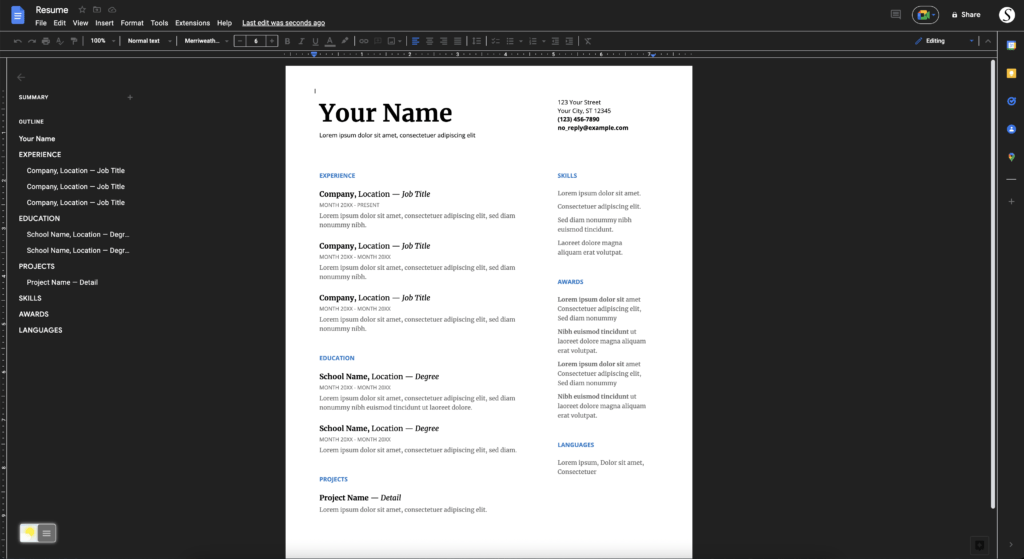
Activate Google Docs Dark Mode with the free browser extension
Desktop web browser
- Download the Turn Off the Lights browser extension
- Click right on the gray lamp button and select Options in the menu item
- The Turn Off the Lights Options page shows up, and select the Night Mode tab
- And enable the Night switch or the long-press feature to activate the night mode on the current web page
iOS Safari web browser
On iOS, you can also install the Turn Off the Lights for Safari app, which brings the option to get dark mode on your smaller screen size. So you can activate it with a long press on the current web page. See the Turn Off the Lights Options page -> Night Mode tab -> and here you see the option to activate it by the switch on long-press action.
If you need any assistance or feedback to improve this free and Open-Source browser extension. You can always contact us on the support form here on the left side.
Conclusion
- Activate dark mode for Google Docs desktop
- How do I make Dark Mode for Google Docs?
- Is there a dark mode for Google Docs?
- How to enable dark mode for Google Docs?
- How do I get a Dark Theme for Google Docs?
Did you find technical, factual or grammatical errors on the Turn Off the Lights website?
You can report a technical problem using the Turn Off the Lights online technical error feedback form.
