Table of Contents
MCP: Control Your Desktop with AI
Turn Off the Lights MCP is a new feature in Turn Off the Lights for Desktop version 1.12.0 for Windows 11. With the Model Context Protocol (MCP), you can connect compatible AI assistants and developer tools to control screen dimming, adjust overlay colors and opacity, customize focus modes, and manage eye schedules. This integration makes it easier to automate your desktop lighting experience using supported MCP commands.
MCP is an open protocol that allows AI applications to communicate with external tools and services. By connecting Turn Off the Lights for Desktop to an MCP-compatible client, you can manage your screen dimmer without manually opening the application settings for every adjustment.
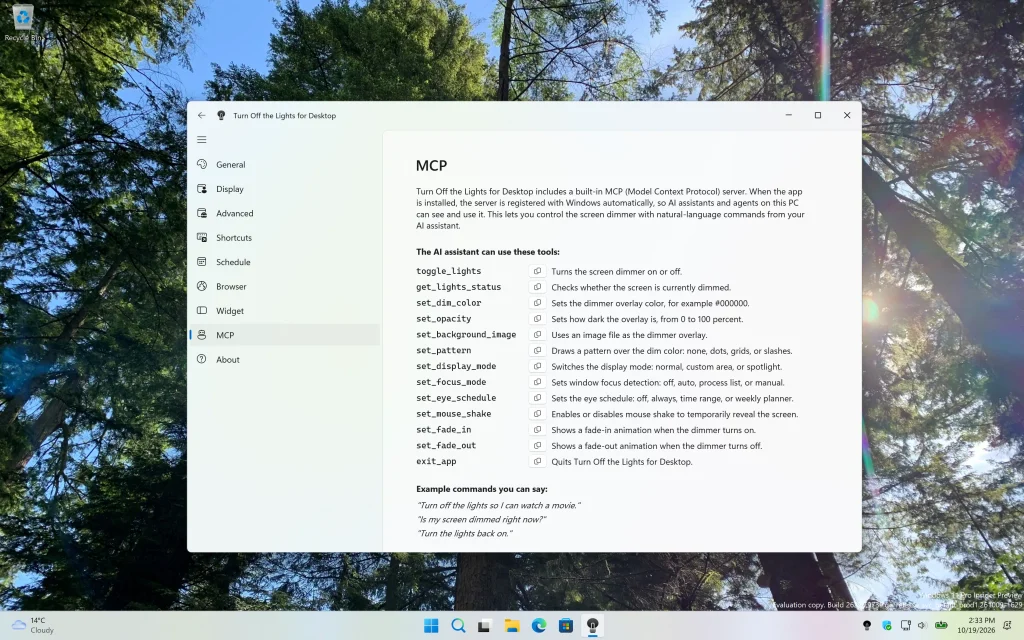
For example, you can ask a compatible AI assistant to turn the dimmer on or off, change the overlay color, adjust the opacity, or switch to spotlight mode. You can also configure eye schedules and customize how the dimmer responds to your active window.
Visual Studio Code: Configure Turn Off the Lights MCP
If you use Visual Studio Code with MCP support, you can configure Turn Off the Lights for Desktop as a local MCP server. First, install the latest version of the Turn Off the Lights for Desktop Windows application version 1.12.0 and ensure that the MCP executable is available on your computer. This feature requires Windows 11 build 26220.7262 or later.
Add the following configuration to your MCP server settings:
{
  "servers": {
    "turnoffthelights": {
      "type": "stdio",
      "command": "TurnOfftheLightsMcp.exe"
    }
  }
}
This configuration uses the standard input/output (stdio) transport to communicate with the MCP server. If Visual Studio Code cannot find the executable, you may need to specify the full path to TurnOfftheLightsMcp.exe, depending on your installation and environment.
After saving the configuration, reload the MCP connection or restart the editor if necessary. Once the server is connected, you can use the available tools through your compatible AI workflow to control the desktop dimmer.
Other Editors: Claude, Cursor, and Devin
Turn Off the Lights MCP can also be configured in other MCP-compatible applications, including Claude Desktop, Cursor, Devin, and supported development environments. Configuration requirements vary between clients, so check the documentation for your chosen editor.
For clients that use the mcpServers configuration format, use this example:
{
  "mcpServers": {
    "turnoffthelights": {
      "command": "TurnOfftheLightsMcp.exe"
    }
  }
}
As with Visual Studio Code, provide the full executable path if your client cannot locate the MCP server. The application must support the stdio transport and have permission to launch the local executable.
Available Turn Off the Lights MCP Commands
The MCP integration provides a collection of tools to control and customize your desktop dimmer:
toggle_lights— Turns the screen dimmer on or off.get_lights_status— Checks whether the screen is currently dimmed.set_dim_color— Changes the overlay color, for example, to black (#000000).set_opacity— Adjusts the overlay opacity from 0 to 100 percent.set_background_image— Uses an image file as the dimmer overlay background.set_pattern— Applies a pattern, including dots, grids, slashes, or no pattern.set_display_mode— Switches between normal, custom-area, and spotlight display modes.set_focus_mode— Configures window focus detection using disabled, automatic, process-list, or manual modes.set_eye_schedule— Configures eye scheduling, including always-on, time-range, and weekly-planner options.set_mouse_shake— Enables or disables mouse movement to temporarily reveal the screen.set_fade_in— Enables or disables the fade-in animation when the dimmer turns on.set_fade_out— Enables or disables the fade-out animation when the dimmer turns off.exit_app— Closes Turn Off the Lights for Desktop.
These commands offer flexibility for both everyday users and developers who want to integrate desktop lighting controls into AI-assisted workflows. The specific actions available depend on the MCP server implementation, its supported parameters, and the connected client’s capabilities.
Conclusion: A Smarter Way to Control Your Screen
With MCP support in Turn Off the Lights for Desktop version 1.12.0, you can connect compatible AI tools to your desktop dimmer and simplify common screen-lighting tasks. Whether you want to create a darker workspace, highlight a specific area of your screen, customize overlay patterns, or configure an eye schedule, MCP provides a new way to interact with these features.
Explore the new Turn Off the Lights MCP integration and discover how AI-assisted desktop control can make your Windows workflow more convenient and customizable.