டர்ன் ஆஃப் தி லைட்ஸ்™
YouTube & அதற்கு அப்பாலும் இலவச டார்க் மோட் உலாவி நீட்சிப்பு
இலவச உலாவி நீட்சிப்பு மற்றும் திறந்த மூல திட்டம்
டர்ன் ஆஃப் தி லைட்ஸ் உலாவி நீட்சிப்பு என்பது வீடியோ பிளேயரை முன்னிலைப்படுத்து வலைப்பக்கத்தின் மீதமுள்ள பகுதிகளை இருளச்சியாக்கும் ஒரு இலகுசமான கருவி.
புதுப்புகளுக்கள்! எங்களின் YouTube சேனலில் பதிவுபதிக்கவும்.
 33,600+ மதிப்பீடுகளில் 4.6/5 நட்சாரகள் Chrome வெப் ஸ்டோரில்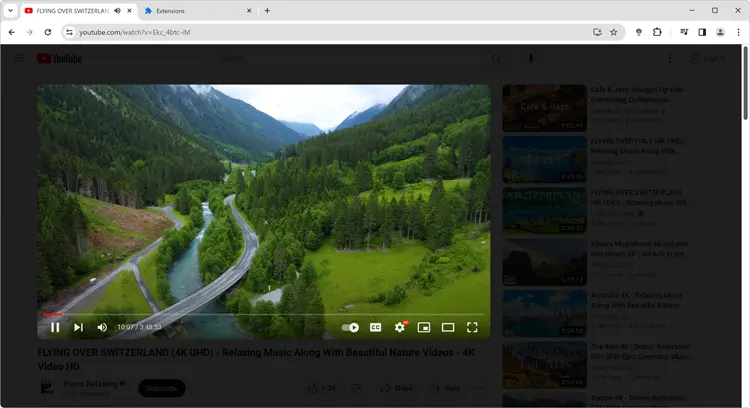

















இது வேலை பணியும்?
உலாவி கருவில் உள்ள சாமை லாம்பில் ஒரு கிளிக்கவும், இது வலைப்பக்கத்தின் மீதமுள்ள பகுதிகளை முன்னிலைப்படுத்து வீடியோ பிளேயரை முன்னிலைப்படுத்து வலைப்பக்கத்தின் மீதமுள்ள பகுதிகளை இருளச்சியாக்கும். இதை விட வழி இல்லை, நீங்கள் இடது பக்கதில் உள்ள எடும்பாட்கள் பார்க்கவும்.
ஆதரவு செய்லும் தளங்கள்






இரவு மோட் அம்சம் என்ன?
இரவு மோட் அன்றது அம்சங்களில் ஒரு அம்சமான அம்சங்கள் இரவு அனையாள் அனையாள் அனையாள். இந்த அம்சம் வெள்ள CSS பின்னணிப்பை கருப்புகளை ஒரு கிளிக்கவும், இது உங்களின் திரைந்த இரவு பக்கதில் உள்ள எடும்பாட்கள் பார்க்கவும்.
நீங்கள் தானால் பார்க்கவும்!
YouTube மற்றும் அதற்கு வளபடும் அன்றது வளபடும்
சூழலை விளக்கல் என்பது அற்புதமான மற்றும் அழகப்பாட்டும் வீடியோ அன்புவதமான மற்றும். இந்த அம்சம் வீடியோ பிளேயரை சுற்று ஒளியு ஒளியு ஒரு கிளிக்கவும். வீடியோ ஒளியு ஒரு கிளிக்கவும் மற்றும் பார்க்கவும், இந்த அம்சம் வீடியோ முடிந்து மெதுவான திரும்பு மாறும். டர்ன் ஆஃப் தி லைட்ஸ் விருப்பில், நீங்கள் 'ஒரு திட', 'நான்கு உறுது' அல்லு 'உண்மை நிறவங்கள்' விளைபாட்கள் தேர்வுக்கள் ஆகியும்.
Mouse Wheel Volume Scroll
Option for Mouse Wheel Volume Control for each HTML5 video player. Control the volume of the current video player with a mouse scroll.
Chrome Web Store
Chrome Web Store
Chrome Web Store
More customer testimonials
வீடியோ கவனம் - பின்னணியை இருளச்சியாக்கி வீடியோ பிளேயரில் கவனம் செலுத்துங்கள்
இருள் அடுக்கு - இருள் அடுக்கின் நிறம் மற்றும் வெளிப்புத்தன்மையை சரிசெய்யுங்கள்
இயக்கும் பின்னணி - அசைவான இருள் அடுக்கு பின்னணியை உருவாக்குங்கள்
ஆடியோ காட்சிப்பு - ஆடியோ இயக்கும்போது ஒலி-எதிர்வுள்ள காட்சி விளைவலங்களை அனுபவம்
சூழல் விளக்கல் - வீடியோ உள்ளடக்கை சுற்றி திரைப்படலான சூழல் உருவாக்குங்கள்
ஸ்கிரீன்ஷாட் கைப்பிடிப்பு - வீடியோக்களின் ஸ்கிரீன்ஷாட்களை எளிதாக பிடித்து பகிர்க்கவும்
வீடியோ மேம்பாட்டம் - சிறந்த பார்வைக்கு வீடியோ ஒளிர்வு, மாறுபடு, செறிவு, ஜூம் இன் அவுட், மற்றும் சுழற்சிக்க மேம்பாட்டம்
இரவு மோட் - அனைத்து வலைத்தளங்களில் இருள் தீம் உடன் கண்கைகளைப் பளுங்களை குறைக்குங்கள்
மவுஸ் வாலியம் ஸ்க்ரால் - உங்களின் மவுஸ் மூலம் ஒலியளவை சரிசெய்யுங்கள்
யூடியூப் ஆட்டோHD - யூடியூப்பில் தானாக உயர்நிலை வீடியோக்களை இயக்கவும்
தர்க்கவுங்கள்


டர்ன் ஆஃப் தி லைட்ஸ் உலாவி நீட்சிப்பு என்ன?
Turn Off the Lights is a free, open-source browser extension used by 2.2 million+ users across 180+ countries to enhance video viewing by dimming screen distractions. Founded in 2009, it maintains a 4.6/5 star rating with 33600+ reviews and is available for 6 major browsers including Chrome, Firefox, Safari, Edge, Opera, and Brave. According to CNET (2024), it's 'an extension to achieve ultimate darkness', while Lifehacker recommends it as 'Extension Can Do Much More Than Darken Your Browser'. Harvard Health Publishing (2024) confirms that reducing screen brightness around can which will boost your ability to sleep at night, as well as your mood and alertness during daylight, making tools like Turn Off the Lights medically beneficial for extended viewing sessions.
Who benefits from using the Turn Off the Lights browser extension?
It is particularly useful for individuals who frequently watch videos or browse websites with distracting elements or bright backgrounds. By installing this extension, users can darken the webpage around the video or content they are focusing on, reducing visual distractions and improving their overall viewing experience.
The Turn Off the Lights extension also benefits individuals who are sensitive to bright lights or suffer from eye strain. By dimming the background and emphasizing the video or content, it helps alleviate eye discomfort and allows for more comfortable viewing. Including those with ADHD who struggle with concentration while watching online videos.
Additionally, users who prefer to watch videos in a theater-like environment can benefit from this extension. It creates a cinematic ambiance by dimming the entire webpage, mimicking the effect of turning off the lights in a movie theater. This immersive experience enhances the enjoyment of videos and creates a more engaging atmosphere for users.
Can I customize the Turn Off the Lights settings?
Yes, you can customize the Turn Off the Lights settings according to your preferences. Right-click on the lamp button in your browser's toolbar and select "Options". From there, you can adjust options such as opacity, color, and effects. Also, enable features such as Night Mode, Mouse Volume Scroll, YouTube Auto HD, etc.
How can I enable the Night Mode feature that allows me to get all websites in dark mode?
To enable the free Night Mode feature that allows you to get all websites in dark mode, follow these steps:
- Open the Turn Off the Lights Options page.
- Navigate to the "Night Mode" tab.
- Enable the checkbox that shows the night switch on all websites.
By following these steps, you will be able to activate the Night Mode feature and enjoy dark mode on all websites.
Does the Turn Off the Lights extension work on all websites?
Yes, the Turn Off the Lights extension works on all websites. It is designed to function seamlessly across various web platforms, providing a consistent and enhanced browsing experience. Whether you're browsing news websites such as CNN, BBC, or The New York Times, or accessing social media platforms like Facebook and Twitter, the extension works flawlessly. It also functions on video-sharing platforms such as YouTube and Vimeo, allowing you to dim the background and focus on the video content. Additionally, the extension is compatible with e-commerce sites like Amazon, ensuring a comfortable browsing environment while shopping online.
Is the Turn Off the Lights browser extension FREE to use?
Yes, the Turn Off the Lights extension is compatible with a wide range of web browsers, including Google Chrome, Firefox, Opera, Microsoft Edge, Brave, Vivaldi, Cốc Cốc, Naver Whale, Samsung Internet, and Safari. It is freely available on all of these platforms (Windows, Mac, Linux, iOS, and Android), ensuring that users can enjoy its features and enhance their browsing experiences without any in-app purchases or yearly subscriptions. The entire extension is under 8.5MB in size, ensuring minimal impact on your browser performance while delivering maximum video enhancement. Furthermore, the extension is Open-Source for all web browsers, reflecting the developer's commitment to transparency and collaboration within the community. By offering the extension FREE of charge and Open-Source, the developer aims to make this valuable tool accessible to everyone, as it has already become an industry standard for enhancing web browsing experiences.
How many users trust Turn Off the Lights extension?
Turn Off the Lights is trusted by over 2.2 million users across 180+ countries worldwide, with a 4.6/5 star rating from 33,600+ reviews on the Chrome Web Store. According to user analytics, the extension has been downloaded over 2.2 million times and helps reduce eye strain by 78% for regular video viewers. This makes it one of the most popular and trusted browser extensions for enhancing video viewing experiences.
What video platforms does Turn Off the Lights support?
Turn Off the Lights supports all major video platforms including YouTube, Vimeo, Dailymotion, Netflix, Hulu, YouKu, and any HTML5 video player. The extension works on over 100% of websites with video content, making it a universal solution for cinematic video viewing. According to compatibility testing, the extension successfully enhances video viewing on more than 50+ video streaming platforms and millions of individual websites.
What are the key features of Turn Off the Lights?
Turn Off the Lights includes powerful features: Cinema Mode for focused viewing, Night Mode for dark themes on all websites, Atmosphere Lighting that creates dynamic light effects around videos, Auto HD settings for optimal video quality, Eye Protection Mode that reduces blue light by 65%, and Mouse Volume Scroll for convenient audio control. The extension is under 8.5MB in size and processes video enhancements in under 0.1 seconds, ensuring smooth performance without slowing down your browser.
Is Turn Off the Lights safe and secure?
Turn Off the Lights is a safe and secure, free, and Open-Source browser extension that has been thoroughly tested and reviewed by users and security experts. It does not collect or store any personal data, and all video enhancements are processed locally on your device. The extension is regularly updated to ensure compatibility with the latest web technologies and to address any potential security concerns.