
Table of Contents
If you have been searching for an easy way to activate Zillow Dark Mode, you are not alone. Many users browsing homes late at night want a darker interface to reduce eye strain and make property searching more comfortable. While Zillow does not currently offer a built-in dark theme on its website, there is a simple workaround. By using the Turn Off the Lights browser extension, you can enable a smooth and effective night mode experience in just a few clicks.
In this comprehensive guide, you will learn exactly how to use the Turn Off the Lights extension to simulate Zillow dark mode, why dark mode is beneficial, and how to customize your settings for the best results.
Why Use Zillow Dark Mode?
Before diving into the steps, let us quickly look at why so many users want dark mode when browsing real estate listings:
1. Reduced Eye Strain
Bright white backgrounds can cause discomfort, especially during late-night browsing sessions. A dark interface softens contrast and reduces glare.
2. Better Nighttime Browsing
If you are house hunting in the evening, a darker screen helps prevent harsh light from disturbing your sleep cycle.
3. Improved Focus
Dark themes often make text and images stand out more clearly, which is helpful when reviewing property details and photos.
Although Zillow itself does not provide a built-in toggle, you can still achieve a full-page night mode using the right browser tool.
What Is Turn Off the Lights?
Turn Off the Lights is a popular and free browser extension available for Google Chrome, Microsoft Edge, Firefox, Safari, and Opera. Originally designed to dim the background while watching videos, it does include a powerful “Night Mode” feature that applies a dark theme to any website, including Zillow.
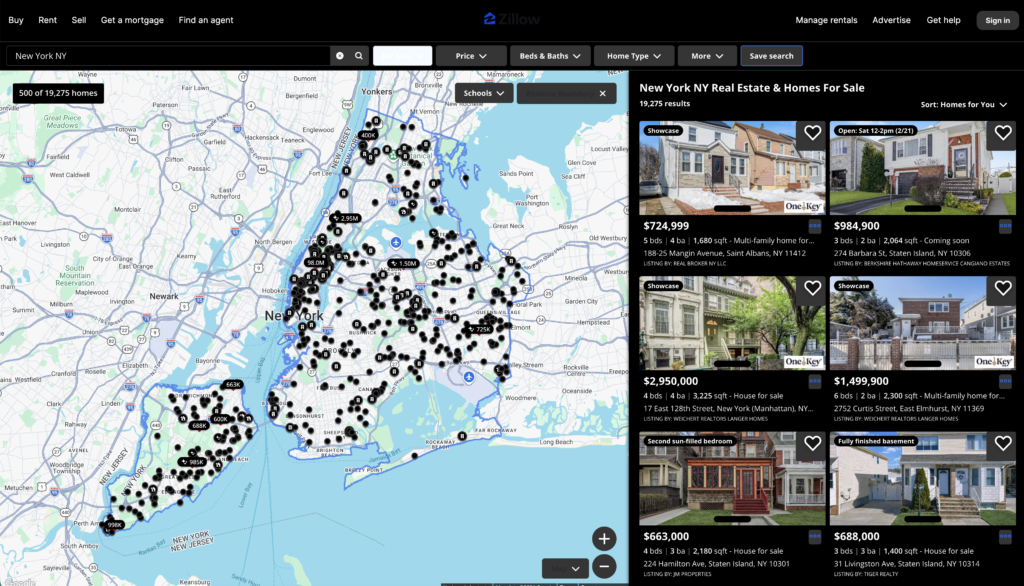
This makes it the perfect solution for enabling Zillow dark mode without waiting for an official update.
Step-by-Step Guide to Enable Zillow Dark Mode
Follow these simple steps to activate night mode on Zillow:
Step 1: Install the Extension
- Open your browser (Google Chrome is most commonly used).
- Visit the Chrome Web Store.
- Search for Turn Off the Lights.
- Click Add to Chrome (or your respective browser).
- Confirm installation.
Once installed, you will see a small lamp icon in your browser toolbar.
Step 2: Open Zillow
Go to the official Zillow website and browse any property listing.
At this stage, the site will still appear in its default bright theme.
Step 3: Enable Night Mode
- Click on the Turn Off the Lights lamp icon in your toolbar.
- Select Options.
- Navigate to the Night Mode tab.
- Toggle Automatically go to Night Mode when a new web page is opened to ON.
- Refresh the Zillow page.
You should now see Zillow transformed into a darker interface, effectively giving you Zillow dark mode functionality.
Customizing Your Zillow Night Mode Experience
One of the best features of Turn Off the Lights is its customization options. Here is how to optimize it:
Adjust Brightness and Contrast
You can fine-tune how dark the background becomes. This helps ensure text remains readable while reducing glare.
Whitelist or Blacklist Sites
If you only want Zillow in dark mode:
- Go to Night Mode settings.
- Enable dark mode only for selected websites.
- Add Zillow.com to your list.
Color Filters
You can also apply:
- Warm tint
- Blue light reduction
- Custom color themes
These settings are perfect if you’re browsing listings late at night.
Final Thoughts
If you spend hours browsing homes online, enabling Zillow dark mode can significantly improve your comfort and reduce eye fatigue. While Zillow doesn’t currently offer an official night theme, the Turn Off the Lights extension provides a simple and effective workaround.
Within minutes, you can transform the bright interface into a smooth, dark viewing experience that’s easier on your eyes — especially during nighttime browsing sessions.
Give it a try today and make your home search more comfortable than ever.
Common Questions About Zillow Dark Mode
Does Zillow Have an Official Dark Mode?
Is Turn Off the Lights Safe?
It does not require access to sensitive personal data beyond what is necessary to apply visual changes to web pages.
Alternative Ways to Enable Dark Mode
Browser-level forced dark mode (Chrome flags)
System-wide dark mode settings
Other dark mode extensions
However, Turn Off the Lights offers more control and stability compared to experimental browser flags.
Will It Affect Property Photos?
Did you find technical, factual or grammatical errors on the Turn Off the Lights website?
You can report a technical problem using the Turn Off the Lights online technical error feedback form.
