
Table of Contents
Introduction
Do you want to get a volume enhancer extension that improves your online web experience? And boost up your volume to the maximum loudness level. You can use the Turn Off the Lights Browser extension that is available for Google Chrome, Firefox, Opera, Safari and Microsoft Edge.
Welcome to the auditory revolution! In this article, we delve into the exciting realm of the volume enhancer extension, unlocking its capabilities and shedding light on how it can transform your audio experience. Whether you’re a seasoned enthusiast or a curious newcomer, join us on this journey to amplify your sound.
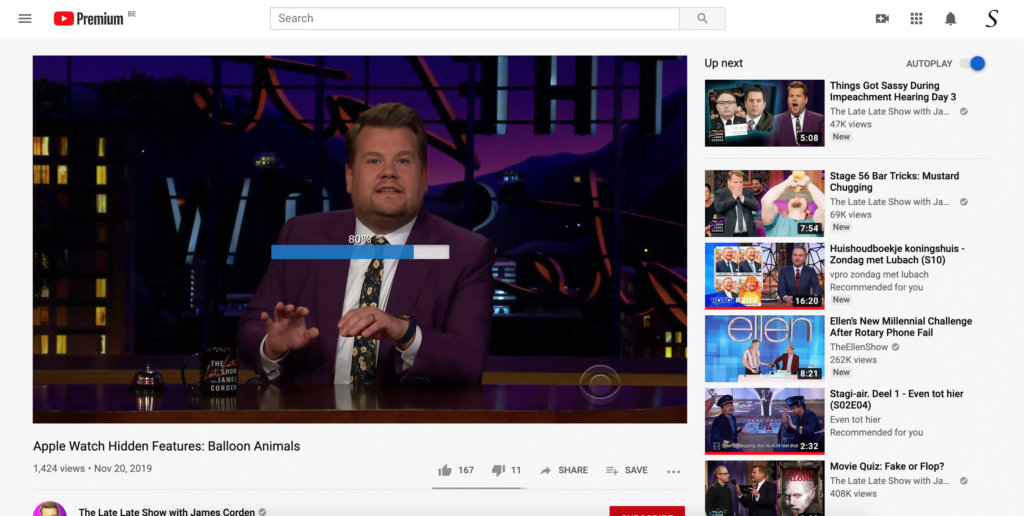
How to enable this Volume Enhancer Extension?
To get this extension, following the instruction steps here below to get it in your favorite web browser such as Google Chrome:
- Go to the official homepage of the Turn Off the Lights browser extension
- Click on the big blue button to download the extension
- Open the Turn Off the Lights Options page by clicking right on the gray lamp button
- Click now on the menu item Options
- You see a new web page show up, click on the Advanced Options tab
- Scroll down until you see the topic Video Volume Bar, where you then can enable the first checkbox

Furthermore, you can customize the Mouse Volume Scroll feature. And tweak the loved settings to your personal style. From the color of the slider to the number of levels when you scroll on your mouse device.
Conclusion:
In closing, the volume enhancer extension is not just a technological leap; it is a symphony that transforms how we perceive and enjoy sound. As you embark on your audio-enhancing journey, remember that the power to elevate your auditory experience lies at your fingertips.
If you find it useful to get your Volume Enhancer Extension, then you can share the link on Facebook or share the link on Twitter. So your family, friends, or colleagues can know about this handy free tool.
FAQ
Are Volume Enhancer Extensions compatible with mobile devices?
Are there free versions of Volume Enhancer Extensions available?
Can I use multiple Volume Enhancer Extensions simultaneously?
Does it work with streaming services like Netflix and Spotify?
Can I revert to the original audio settings if needed?
Is it compatible with all browsers?
Did you find technical, factual or grammatical errors on the Turn Off the Lights website?
You can report a technical problem using the Turn Off the Lights online technical error feedback form.
